Structured View Modes, Approvals & Model Controls
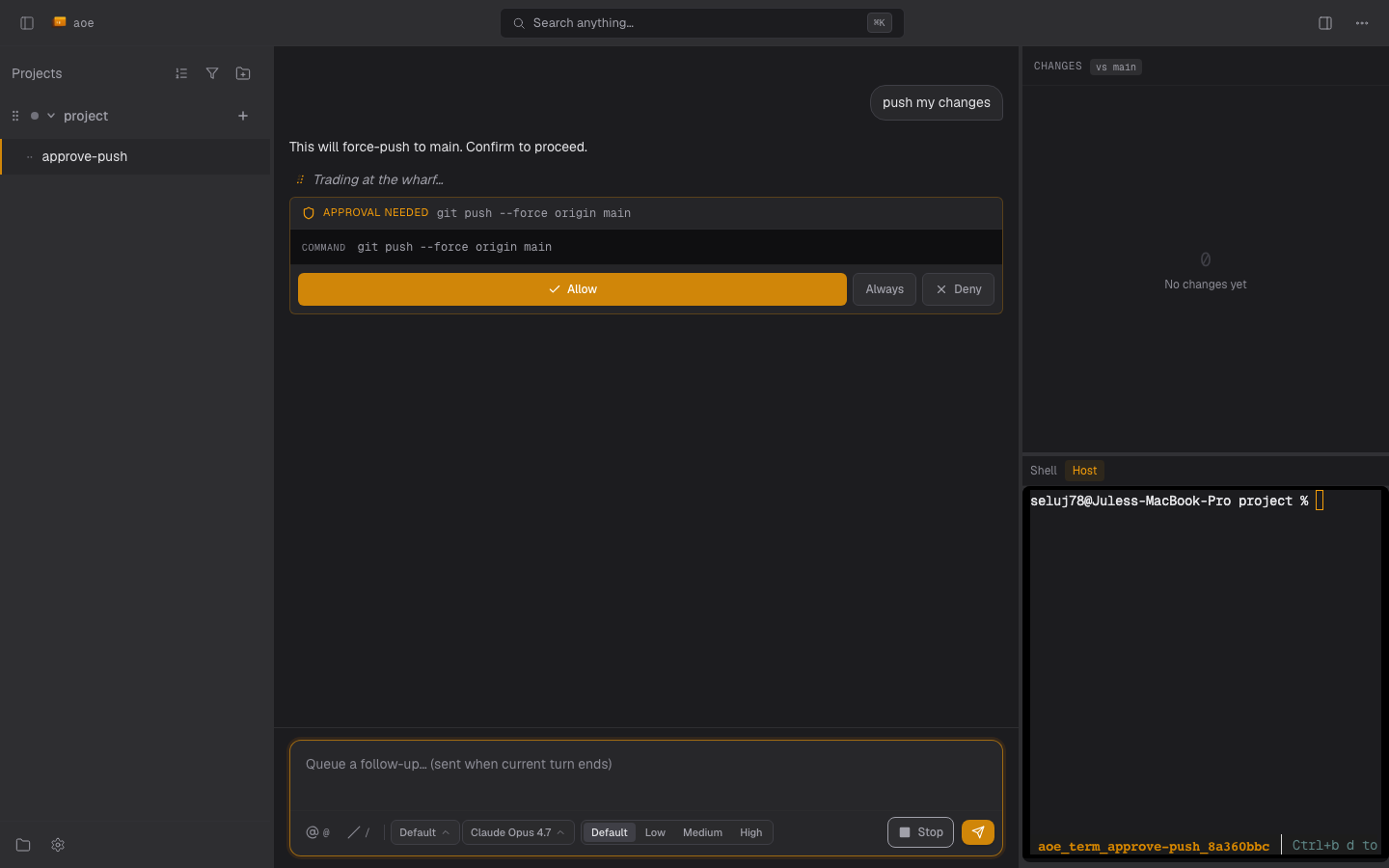
The composer footer is where you steer a structured-view session: the permission mode decides what runs without asking, approval cards gate the rest, and model and reasoning-effort selectors tune the agent when the adapter advertises them. For the surrounding UI, see Interface.
Permission modes and YOLO
A session runs in one of the modes its adapter advertises. For claude-agent-acp the typical set is:
| Mode | Meaning |
|---|---|
default |
Every Write/Edit/Bash routes through an approval card. |
acceptEdits |
Edit-kind tools auto-approved; Bash and unknown tools still prompt. |
bypassPermissions |
All tools auto-approved (YOLO). |
plan |
Read-only; the agent drafts a plan but runs no side-effectful tools. |
Other adapters report their own ids (Gemini’s auto_edit and yolo map onto acceptEdits and bypassPermissions).
[session] yolo_mode_default, or the wizard’s “Auto-approve actions” toggle, asks the adapter to start in bypassPermissions. This is best-effort: if the adapter refuses, an amber notice appears and the session keeps whatever mode it landed in. claude-agent-acp offers bypassPermissions only when aoe serve was launched with ALLOW_BYPASS=1 in its environment; without it, use acceptEdits or approve as you go.
Approvals
When the agent wants to run a tool that needs approval, a card appears. Benign tools (read, search, list) take a single tap. Destructive ones (rm -rf, git push --force, writes to system paths) take an 800 ms long-press with a confirmation ring, so a single tap is reserved for deny. The web card shows a one-line preview of the call in its header (the command, or the path); a benign approval starts collapsed and a destructive one expanded.
[acp]
approval_timeout_secs = 300              # a pending approval auto-cancels after this
destructive_require_double_confirm = true
The card clears as soon as your decision is accepted, and resolving one that already settled (a concurrent decision, or the watchdog) clears it quietly instead of erroring. An expired approval sends the agent a structured cancellation, so it usually asks again.
Some agents put a question in the permission options rather than an allow/deny vocabulary (pi’s ask_user_question sends one allow_once option per answer). The daemon spots that (every option carries the same kind, so there is no allow/deny meaning to read) and renders the labels as one button each. Dismiss cancels the request rather than answering it, so the agent is never handed an answer you did not pick, and a destructive tool keeps its hold-to-confirm on every answer that would run it. Lists mixing kinds stay on the Allow / Always / Deny buttons.
Approving from the TUI home list
Select a structured session and press a to answer its first pending approval without entering the transcript. The dialog shows the session, tool, target, and any destructive warning; long text is elided, so open the structured view when you need the full request. a allows, A allows always, d denies; arrows or Tab select a button, Enter submits, Escape closes without answering. Requests whose options are answers rather than allow/deny send you to the structured view, so the home action never picks an answer implicitly.
Questions (AskUserQuestion)
Some agents ask a structured question mid-turn rather than guessing. The daemon advertises the ACP form-elicitation capability, so with claude-agent-acp the built-in AskUserQuestion tool renders as a question card, and an MCP server attached to the agent can collect arbitrary structured input through the same card.
- Single-choice questions render as radio buttons and multi-choice as checkboxes, each with its own free-text “Other” box. An option’s explanation renders as a second line.
- MCP forms can add text fields (typed by format, so email / URL / date get the matching control), number and integer fields, and yes/no checkboxes, pre-filled with any default the agent supplies.
- Submit sends your answers and the turn continues. Skip answers nothing and leaves a short note; Cancel aborts the tool call.
- Your answer is recorded in the transcript as your turn, so the history shows what you chose.
- Required fields and every schema constraint (selection min/max, text length, pattern, numeric range) are enforced before Submit, and the daemon re-validates, so a stale or malformed answer never reaches the agent.
The rich form is web-first. The TUI answers the common case natively: when every required question is single-select, a in the transcript pane opens a picker per question and submits the choices (the free-text box is omitted). Forms with required text, multi-select, or number fields point at the dashboard, and s / c skip or cancel, so a TUI-only session never stalls on a question.
Notifications and sound
When an approval lands and you are away from the dashboard, two channels fire:
- Web push, tagged
acp-approval-<session>, deep-linking back to the session. Unlike status pushes, approval pushes are not suppressed when the dashboard or TUI is active; focused clients get an in-app toast. See Push notifications. - Browser sound: the dashboard plays
[sound] on_approvalwhenever pending approvals go from zero to non-zero. It plays client-side becauseaoe serveoften runs on a remote box.
Model and reasoning effort
When the adapter advertises them, the composer footer shows a model dropdown and a reasoning-effort selector beside the mode pill. claude-agent-acp v0.39.0+ advertises a model selector for every session, and a reasoning-effort selector when the current model reports supportsEffort. Adapters advertising neither show no pickers, by design.
The chip keeps the previous value until the adapter confirms, so it never snaps back on a slow connection. The effort dropdown’s Default option drops any session-level pin so the model uses its own budget. A rejected switch (rate limit, transient error) shows an amber non-blocking notice with the adapter’s reason, which clears when a later snapshot reports the requested value. The selector list clears when you switch agents but survives /clear. How the two underlying ACP channels are normalized is in Structured View Internals.
Session persistence
Workers and transcripts outlive an aoe serve restart, a closed laptop, and a reconnect: in-flight turns continue and the next daemon reattaches. To actually terminate a worker, use aoe acp stop <session> (graceful) or aoe acp kill (force). For agents that support session restoration (Claude today) the model keeps its context across restarts too, so a follow-up like “what did we just decide?” still works. The mechanics are in Structured View Internals.