Web Dashboard
Monitor and drive agent sessions from any browser. The dashboard is an embedded server inside the aoe binary; start it with aoe serve. Sessions run server-side (a real tmux session, or a persistent worker for structured-view sessions), so they survive browser crashes, network drops, and reconnects.
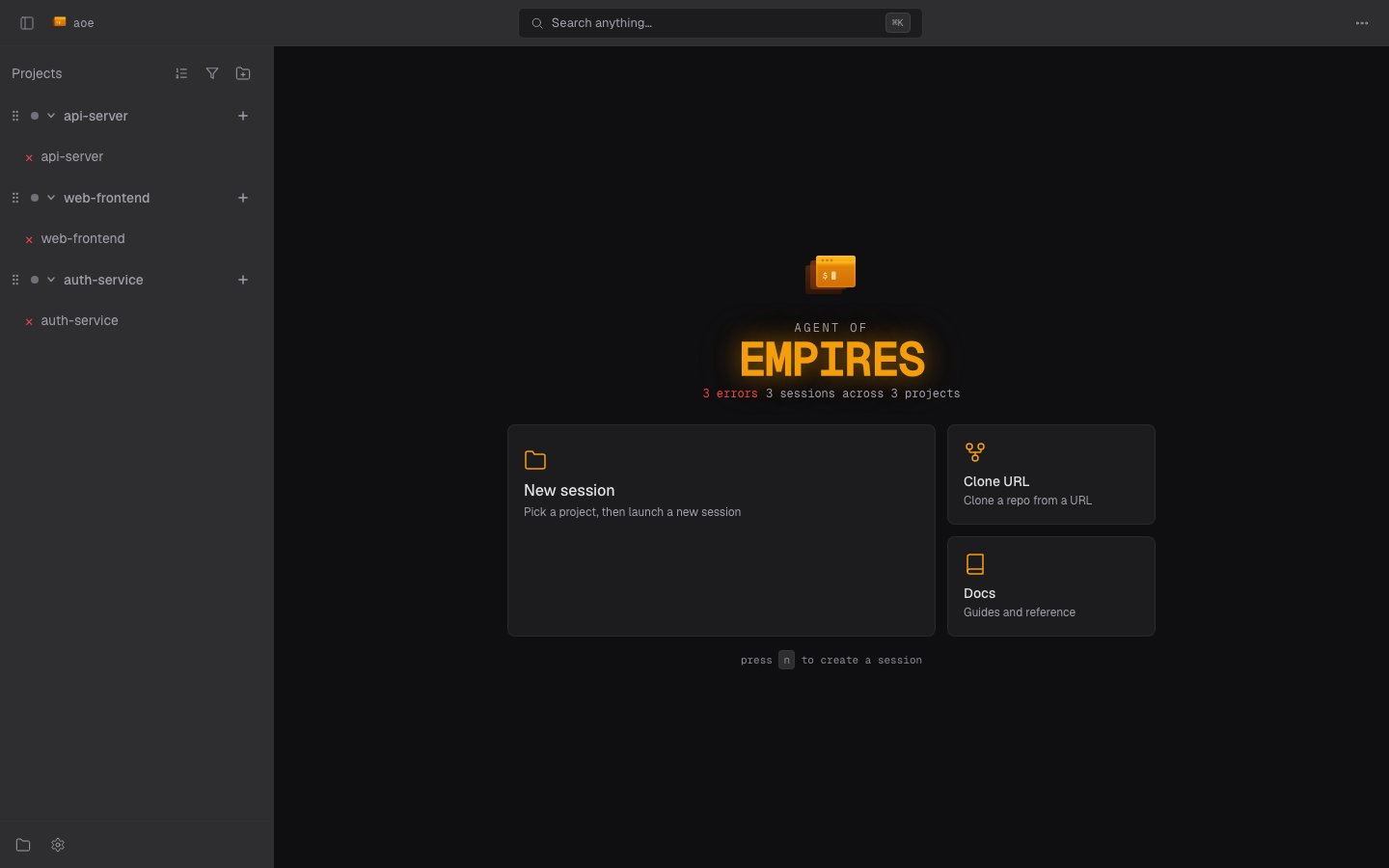
This page covers running the server, access modes, security, and PWA install. The surface itself has its own pages:
- Dashboard & workspaces: layout, the session wizard, sorting and grouping, triage, settings and profiles, mobile behavior.
- Terminal view: agent and paired terminals, reconnect behavior, read-only mode.
- Diff view: reviewing changed files and commenting on them.
The dashboard ships in every release binary, so aoe serve just works. Building from source needs the web Cargo feature and Node; a plain cargo build still serves the API, with no dashboard behind it.
Starting the server
aoe serve                       # Localhost only (default)
aoe serve --remote              # Remote over HTTPS (Tailscale Funnel, else Cloudflare)
aoe serve --host 0.0.0.0        # LAN/VPN access over HTTP (use a VPN)
aoe serve --daemon              # Run in the background (--stop to stop it)
aoe serve --open                # Open the URL in a browser when ready
aoe serve --remote --read-only  # Monitor without sending keystrokes
From the TUI, press R (Ctrl+R with strict hotkeys), shown as R Web in the shortcut bar, to start a background server on your network or over a tunnel. While it runs, the entry reads R ● Web in green.
The server prints a URL carrying an auth token; the token becomes a cookie on first visit. --open is suppressed with --daemon, --remote, and whenever no browser you could see is reachable (SSH without DISPLAY, a Linux host with no display server); setting BROWSER overrides that check except on macOS.
In --remote mode the token rotates every 4 hours, so a URL captured at startup eventually stops working. aoe url prints the live one against a running daemon (--all for every labeled URL, --token-only for scripted login), and --remote prints a QR code for phone pairing.
Remote access
--remote is the recommended way to reach the dashboard from a phone. aoe picks a transport in this order.
1. Tailscale Funnel (preferred). If tailscale is on PATH and logged in, aoe runs tailscale funnel --bg --yes <port> and serves from your stable https://<machine>.<tailnet>.ts.net URL. This is the only option where a PWA installed on your phone keeps working across server restarts. One-time setup (aoe surfaces the fix when a gate is missing): install Tailscale and run tailscale up, enable Funnel for your tailnet at login.tailscale.com/f/funnel, then grant the node the funnel nodeAttr in your ACL, for example { "target": ["autogroup:member"], "attr": ["funnel"] }. If port 443 already carries a non-loopback Funnel service, aoe refuses to start rather than replace it; clear it with tailscale funnel reset or pass --no-tailscale.
2. Named Cloudflare tunnel. A stable hostname on your own domain, and it takes precedence over Tailscale when you pass the flags:
cloudflared tunnel create my-tunnel
# Add a CNAME: aoe.example.com -> <tunnel-id>.cfargotunnel.com
aoe serve --remote --tunnel-name my-tunnel --tunnel-url aoe.example.com
3. Cloudflare quick tunnel (fallback, needs cloudflared on the host). Zero-config, but the URL rotates on every restart, which breaks an installed PWA. aoe prints a notice when it falls back here.
Flags
| Flag | Default | Description |
|---|---|---|
--port |
8080 | Port to listen on |
--host |
127.0.0.1 | Bind address; 0.0.0.0 for LAN/VPN access |
--auth |
token |
token (URL token), passphrase (login wall only), none (loopback only unless --behind-proxy). --no-auth is an alias for none |
--passphrase |
Passphrase for the login wall, also read from AOE_SERVE_PASSPHRASE. Valid with --auth=token and --auth=passphrase |
|
--behind-proxy |
off | An external proxy terminates TLS: sets ; Secure cookies and trusts X-Forwarded-For / cf-connecting-ip from loopback peers. Spawns no tunnel and requires at least one --allowed-host |
--allowed-host |
Extra Host the DNS-rebinding gate accepts (repeatable) |
|
--allowed-origin |
Extra browser Origin to accept (repeatable, full scheme://host[:port]); only needed for a proxy on a nonstandard port |
|
--remote |
off | Expose over an HTTPS tunnel |
--tunnel-name / --tunnel-url |
Use a named Cloudflare tunnel and its hostname (with --remote) |
|
--no-tailscale |
off | Skip Tailscale auto-detection and use Cloudflare |
--read-only |
off | View terminals but send no keystrokes |
--daemon / --stop |
off | Fork to the background, or stop a running daemon |
--auth=passphrase and --auth=none on a non-loopback bind require --behind-proxy; --auth=passphrase requires a passphrase; --auth=none with a passphrase is rejected; and --remote refuses both reduced modes, since a public tunnel mandates token auth plus a passphrase. The TUI structured view has no passphrase exchange, so keep --auth=token on daemons you also drive from the local TUI.
Behind a reverse proxy
When TLS is terminated upstream (Traefik, nginx, Caddy) and forwarded to a loopback aoe serve:
aoe serve --host 127.0.0.1 --port 42041 \
  --auth=passphrase --passphrase "$AOE_PASSPHRASE" \
  --behind-proxy --allowed-host aoe.example.com
The upstream must set X-Forwarded-For (or cf-connecting-ip); aoe reads the last value as the client IP, and only when the socket peer is loopback, so a misconfigured upstream cannot spoof it. --behind-proxy also withdraws the same-host bypass, so a browser on the daemon’s own host signs in with the passphrase like any other client, and the local TUI and aoe acp commands log in with the daemon’s own serve.passphrase. Add --allowed-origin https://aoe.example.com:8443 when the proxy listens on a nonstandard port. Both flags are replayed across aoe serve --restart.
Running under systemd
aoe serve supports Type=notify when NOTIFY_SOCKET is set, using pathname or Linux abstract (@name) sockets. It sends READY=1 after binding the listener and starting workers/tasks, and STOPPING=1 when shutdown starts. Writes run outside async workers and each has a one-second timeout; a receiver that remains full can still cause READY=1 to be lost. Wrappers such as cargo run require NotifyAccess=all, since systemd otherwise accepts messages only from the main process.
Security
The dashboard exposes terminal access. Anyone who authenticates can send keystrokes to your agent sessions, which run as your user.
- Token auth (default): a random 256-bit token generated at startup and stored in
serve.tokenin the app dir, passed by URL on first visit, then kept as anHttpOnly; SameSite=Strictcookie. - Passphrase wall: an argon2-hashed passphrase gates
/login, and sessions bind to a per-device secret inlocalStorage, so a leaked cookie alone is not enough. Five failed logins from an IP trigger a 15-minute lockout. - Token rotation: in
--remotemode the token rotates every 4 hours, with a 5-minute grace for active sessions. - Connected devices: signed-in devices (browser, origin IP, last seen) are listed under Settings > Web Dashboard > Connected Devices, where you can revoke one or sign every device out.
- Session persistence: login sessions persist to an owner-only
login_sessions.toml, so devices stay signed in across a daemon restart. A passphrase change drops them all;auth.persist_sessions = falseopts out. - Step-up elevation: writes that could plant code for, or widen, the next session spawn need a passphrase confirmation valid for 15 minutes. That covers the
sandboxandworktreesections plusacp.restrict_agents,skills.auto_propagate,session.smart_rename_model, andsession.inherit_host_environment; the gate is per field, and localhost browsers skip it entirely, since a same-host caller already passes the filesystem trust boundary. - Local-only fields: agent commands and status-hook shell commands map names to arbitrary host commands, so the server rejects any PATCH touching them. Edit those in the TUI on the host.
Responses carry X-Frame-Options: DENY, X-Content-Type-Options: nosniff, and Referrer-Policy: no-referrer (the last keeps tokens out of Referer).
Plugin pages
A plugin page is framed with sandbox="allow-scripts" and served under its own policy (see Pages), so its script runs in an opaque origin: it cannot read the dashboard’s token, binding secret, storage or cookies, call the API, or navigate the dashboard. Because a frame load cannot send the device-binding header, the dashboard first mints a page ticket through a bound request. The ticket rides an HttpOnly cookie scoped to that page’s URL, lasts 60 seconds, and authenticates only that page for the still-signed-in session that minted it; it never appears in the frame URL or document. That route is the only one framable, and only by the dashboard.
DNS rebinding
aoe serve validates Host and Origin before authentication: an unlisted Host, or any Origin that is sent and not allowlisted (including the opaque Origin: null), gets 403. A request with no Origin is exempt from the origin check. The allowlist is derived automatically from localhost, 127.0.0.1, ::1, a concrete --host, any routable IP literal (an IP is dialed directly and cannot be rebound), and --remote tunnel hostnames. The unspecified, link-local, and multicast addresses are excluded and cannot be allowlisted at all.
So a wildcard bind is reachable by its LAN or tailnet IP with no extra flag. Only reaching it by a hostname (mDNS, MagicDNS, custom DNS) needs --allowed-host, because a hostname is what a rebinding attacker controls:
aoe serve --host 0.0.0.0 --allowed-host my-box.tailnet.ts.netSafe usage patterns
- Localhost (
aoe serve): same security as the TUI. - Remote via tunnel (
--remote): HTTPS; recommended for phone access. - Over a VPN (
--host 0.0.0.0on Tailscale/WireGuard): the VPN encrypts. - Behind a reverse proxy (
--auth=passphrase --behind-proxy): TLS upstream, passphrase as the only human gate. - Read-only (
--read-only): monitor without input.
Refused outright: --auth=none --host 0.0.0.0 without --behind-proxy, and --remote with either reduced auth mode. Plain --host 0.0.0.0 on public WiFi is unencrypted HTTP; use a VPN or a tunnel.
Installing as a PWA
The dashboard installs as a Progressive Web App: Chrome’s three-dot menu > “Install Agent of Empires”, Safari’s File > Add to Dock, or Share > Add to Home Screen on iOS. Install it from a Tailscale Funnel or named-Cloudflare URL, since a home-screen app is bound to its install URL and a quick tunnel’s rotates.
Keep the server up with --daemon. Reopening the PWA returns to the session you last had open (remembered per device), or the dashboard if that session is gone. Stopping the server exits within about five seconds even with open tabs; live clients get a 1001 close frame and reconnect once a fresh server is up.
CityHall client mode
AOE_CITYHALL_MODE=1 aoe serve --host 0.0.0.0 (or --cityhall) starts the dashboard as a locked-down end-user client: only the message composer and the structured view are reachable. Terminal and diff panes, project and profile management, plugin lifecycle, and agent/worker controls are hidden in the UI and refused server-side, so a direct API or WebSocket call cannot reach them either. Every mutating route is default-deny unless explicitly allowlisted, session creation is server-derived, and the session list is filtered to the structured sessions the mode creates. Settings are curated down to Theme, a delete-to-trash toggle, MCP servers and Plugins (display only), and Telemetry.
New sessions are created by name only; each spans every configured project and runs the default agent in structured view, so that agent must be ACP-capable and at least one project must be configured. The mode is persisted in serve.launch, so it survives aoe serve --restart and the post-aoe update re-exec.
The CityHall config bundle
A locked-down client cannot configure itself, so a bundle does it: one TOML document describing a workspace’s settings and projects.
schema_version = 1

[settings.acp]
default_agent = "claude-code"

[[projects]]
name = "cityhall"
remote = "https://github.com/agent-of-empires/cityhall.git"
default_base_branch = "main"
Projects are addressed by git remote, not path: apply clones each remote into <app_dir>/repos/<name> and registers it. Settings are a sparse patch, keyed section then field, validated like a PATCH /api/settings body.
Produce one with aoe cityhall export --out cityhall.toml or from the dashboard’s Settings > CityHall tab (host-specific and local-only fields are omitted, and no credential is ever exported), and apply it with aoe cityhall apply cityhall.toml. Applying is idempotent: an existing checkout is left untouched so uncommitted work survives, an already-registered project is not re-added, and a repo that fails to clone is reported without taking the others down. A bundle sets values; it cannot unset them.
To have a workspace fetch its bundle at startup, set AOE_CITYHALL_BUNDLE_URL (and AOE_CITYHALL_BUNDLE_TOKEN for the bearer token). The fetch happens before any config is read. On a first boot a fetch failure is fatal, rather than leaving a user in a workspace with no projects; once a bundle has been applied it is cached, and a later failure only warns and serves the cached configuration. A malformed bundle, or one naming an unknown setting, is fatal either way.
A git identity and credential arrive in the same document ([git]), which is what makes clone, pull, and push work inside a workspace. export never writes that section; the host serving the bundle composes it per user.